In This Article:
What is a Deposit Limit?
When do Limits reset?
How do net deposit Limits work?
How do I know how much of my Limit is left?
What are the different types of Deposit Limits?
Deposit Limit FAQ's
Carry out a Self-Assessment
What is a Deposit Limit?
This simple tool can help you to control how much you spend in a daily, weekly, or monthly period - you decide. Deposit Limits consider both deposits into your account and withdrawals, this means they are a 'net' amount (deposits - withdrawals).
Deposit Limits can help you manage your spending if you ensure you set responsible limits which are relevant to your personal financial situation and indicate funds you can afford to lose.
When do Limits reset?
For simplicity, limits run on a fixed calendar basis:
- Monthly limits reset on 1st of the month at 00:00 (UTC - Coordinated Universal Time).
- Weekly limits reset on Mondays at 00:00 (UTC - Coordinated Universal Time).
- Daily limits reset at 00:00 every day (UTC - Coordinated Universal Time).
How do net deposit Limits work?
When you make a deposit, your remaining limit goes down. When you withdraw, your remaining limit goes up. Here's some examples:
Example 1: Monthly Limit
You have set a £200 per month Deposit Limit on your account. Monthly limits run from the 1st to the end of the month.
On the 10th of the month:
- You deposit £100.
- You withdraw £50.
- You now have £150 left to deposit for rest of the month. (£200 limit - £50 in net deposits).
On the 20th of the month
- You deposit another £150, reaching your £200 Deposit Limit for the month.
- You can't deposit more funds into your account until the 1st of the following month (unless you went on to withdraw).
Example 2: Weekly Limit
You have set a £50 per week Deposit Limit on your account. Weekly limits run from Monday to the following Monday.
On Monday:
- You deposit £20.
- You now have £30 of your limit remaining for the week (£50 limit - £20 deposit).
On Tuesday:
- You withdraw £30.
- You now have £60 remaining for the rest of the week (£30 remaining limit + £30 withdrawal).
On Thursday:
- You deposit £60.
- You can't deposit more funds until the following Monday (unless you went on to withdraw).
How do I know how much of my Limit is left?
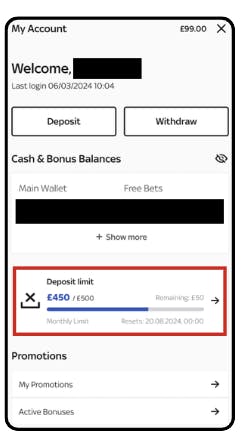
Don't worry, we'll do the calculations for you! Simply head to 'My Account'. Here you will see a deposit limit widget showing your current limit and any remaining value.
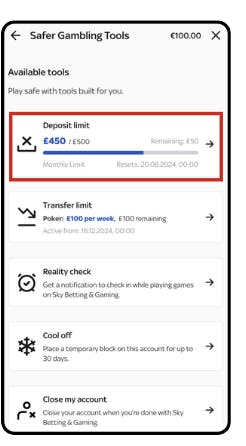
Alternatively, you can visit the Deposit Limit Tool on your Safer Gambling Tools Page.
What are the different types of Deposit Limits?
Set by you.
- You can change this at any time.
- Decreases take effect instantly.
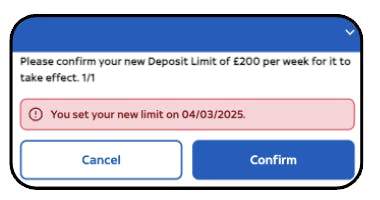
- Increases take 24-hours to become active. After the 24-hour period you will need to re-confirm your Deposit Limit by visiting 'My Account' or the 'Safer Gambling Tools' page. We cannot override the 24-hour period or make it shorter. If the increase comes into effect while you are logged in, you may have to log out and back to accept the increase.
Set by us.
Limits can be set by us in three ways:
- By one of our agents - following a conversation with you or review of your account.
- Automatically - using a range of data including soft credit checks and your account information.
- Automatically/manually on return of a GAMSTOP/Sky Betting & Gaming self-exclusion.
*All information we receive is encrypted for maximum security and peace of mind.
If you would like to decrease a limit set by us, please contact our help and support via the 'Contact us' button as the bottom of this page, where an advisor can assist in lowering the limit.
If you would like to increase a Limit Set By Us, you can find more information on how to do this on our dedicated Help Centre Article here.
How do I set my own Deposit Limit?
Select 'My Account' then 'Safer Gambling Tools'. If you have never set a limit on your account, select 'Set Deposit Limit'. If you already have a limit set, select 'Edit Deposit Limit'. You can also click a link below to do this directly:
Sky Poker
When deciding on the amount for your limit, you should consider how much you're willing to, and how much you can afford to lose. You could consider your incomings such as salary and your regular outgoings such as rent, bills and savings to understand how much you have available for non-mandatory expenses such as leisure activities. Your gambling limit should be a proportion of the money you have available for leisure activities.
There are several resources that can help you decide on a suitable limit, such as online budget calculators.
I haven't hit my limit. Why can't I deposit?
There are several situations where you haven't hit a limit but cannot deposit. Firstly, if you've recently updated your Deposit Limit, you should consider that any previous deposits will still count toward your new limit.
Secondly, we suggest that you double check that all the details of the card on the account are correct and in date.
If the card is in date and has the correct details then you not being able to deposit is likely due to there being more than one limit on your account - the one you've set, and one set by us. Swipe between the limit cards in the Deposit Limits hub and you can see which limit is impacting your ability to deposit.
Finally, if all card details are correct and there is not more than one limit on the account then it is likely we have implemented a block on the account to prevent any further deposits. We would advise you to contact us where we will be able to discuss the account in further detail.
I have increased my limit, but it hasn't updated, why?
It takes 24-hours to increase your Deposit Limit. We are unable to override this. You can see when your new limit is due to come into action within the Deposit Limits hub. You may need to log out and back in to trigger the increase when the 24-hours has elapsed.
There's more than one limit on my account, which one applies?
The lowest limit at any one time will be the one that takes effect on your account.
How do I raise my Deposit Limit after returning from a GAMSTOP/SBG Self-Exclusion?
If you have recently returned from a Self-Exclusion, including GAMSTOP, maximum limits apply to all accounts for a minimum of 6 months.
If you want to increase your Deposit Limit, only after 6 months have passed since returning, you will need to contact one of our agents on 0808 168 9222 to discuss. You will be asked to provide documentation to help ensure the increase is affordable for you.
Carry out a Self-Assessment
Curious about your habits? You can find out how safe your gambling is via GamCare. In an online assessment, you'll be asked a series of statements about your gambling behaviour on a scale of 1 - 10. At the end, you'll be provided with a breakdown of how gambling is affecting your life, alongside personal recommendations for your next steps.
Take a Self-Assessment
To learn more about our Safer Gambling tools click here.